Free Tablet With Medicaid: How to Qualify in 2026
If you receive Medicaid, you may have searched for a free tablet with Medicaid or a free government tablet with Medicaid. Medicaid can provide an important pathway to government-supported connectivity assistance, but there is an important detail to understand; Medicaid does not directly give you a free tablet.
Instead, Medicaid participation can help you qualify for the federal Lifeline program. After your eligibility is confirmed, you can look at participating providers and see whether they currently offer a tablet.
Can You Get a Free Tablet With Medicaid?
USAC currently lists Medicaid as one of the government assistance programs that can qualify a consumer for Lifeline. You can also qualify through household income if you meet the applicable income requirement.
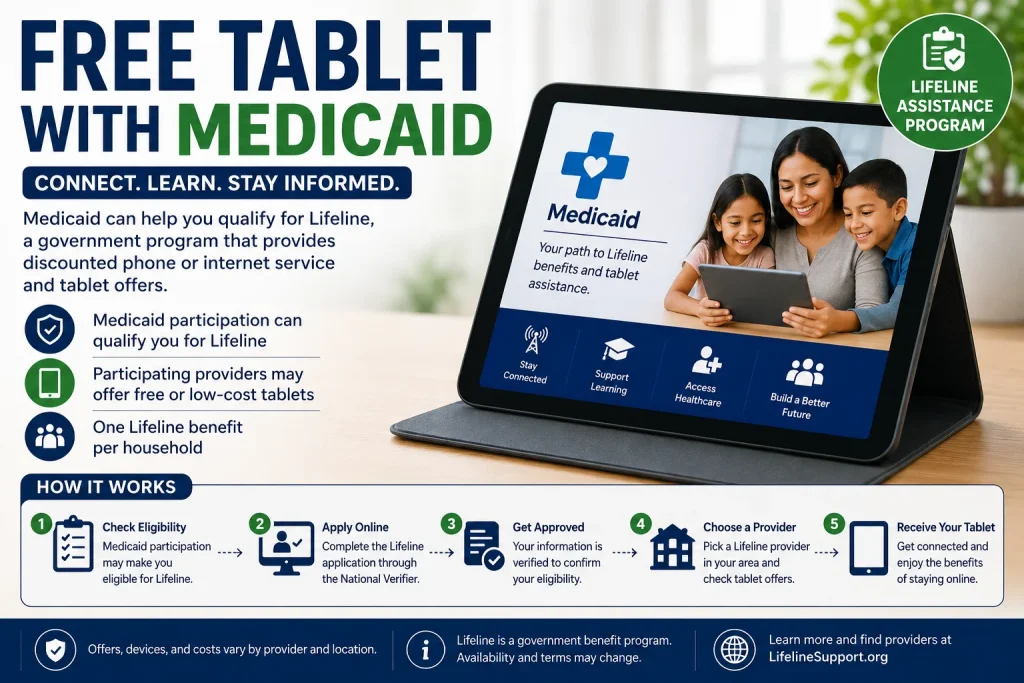
The process is best understood as:
Medicaid → Lifeline eligibility → Verification → Participating provider → Available tablet offer
This distinction is important because Lifeline is primarily a communications assistance program. It provides a monthly benefit toward qualifying phone or internet service. A tablet is a separate device offer that depends on the provider.
How Does Medicaid Help You Get a Tablet?
Medicaid and Lifeline are different programs.
Medicaid provides health coverage to eligible individuals and families.
Lifeline helps eligible low-income consumers reduce the cost of qualifying communications service.
If you participate in Medicaid, that participation can establish a program-based eligibility path for Lifeline.
Once your Lifeline eligibility is confirmed, you can choose a participating provider and ask about available device offers.
So, the connection looks like this:
Medicaid participation
↓
Lifeline eligibility
↓
National Verifier checks your information
↓
Choose a participating provider
↓
Check current tablet availability
This is why searches for a “free tablet with Medicaid” usually lead back to Lifeline rather than a separate Medicaid tablet program.
Does Medicaid Automatically Give You a Free Tablet?
No.
Having Medicaid does not mean that a tablet will automatically be mailed to you.
There are three different things to keep separate:
| Benefit or Program | What It Can Do | Does It Guarantee a Tablet? |
|---|---|---|
| Medicaid | May establish Lifeline program eligibility | No |
| Lifeline | Provides a monthly communications benefit | No |
| Provider offer | May include a tablet or other device | Depends on current offer |
A participating provider may offer:
- A $0 tablet
- A discounted tablet
- A low-cost tablet
- A phone instead of a tablet
- No tablet offer at the time you apply
The available option can change based on the provider, your location, current inventory, and the terms of the offer.
Who Can Qualify for Lifeline Through Medicaid?
USAC lists Medicaid as a qualifying program for Lifeline.
You may qualify through Medicaid if you, your child, or your dependent participates in the qualifying program. You must still complete the required eligibility verification process.
You do not generally need to qualify through both Medicaid and income.
There are two main Lifeline eligibility paths:
Program-Based Eligibility
You participate in a qualifying program such as:
- Medicaid
- SNAP
- Supplemental Security Income (SSI)
- Federal Public Housing Assistance
- Veterans and Survivors Pension Benefit
- Certain qualifying Tribal programs
Income-Based Eligibility
You may qualify if your gross household income is at or below 135% of the Federal Poverty Guidelines. The limit depends on household size and location.
For 2026, the limit for a household of one in the 48 contiguous states, D.C., and territories is $21,546. For a household of four, it is $44,550. Alaska and Hawaii have different limits.
If you already qualify through Medicaid, the program-based route may be the more relevant path.
What Documents Do You Need?
The National Verifier may be able to confirm Medicaid participation automatically through government databases.
USAC explains that the National Verifier uses automated database connections to verify eligibility, including a connection with the Centers for Medicare and Medicaid Services (CMS) for Medicaid.
If your information cannot be verified automatically, you may be asked to provide additional documentation.
Possible documentation may include an official document showing your Medicaid participation.
Your documentation should contain the information required by the Lifeline verification process.
For example, documentation may need to show:
- Your name
- The qualifying program
- The issuing agency
- A relevant issue date or benefit period
USAC provides specific documentation requirements depending on the verification issue.
Do not upload random documents simply because they mention Medicaid. Follow the instructions provided by the official application system.
How to Apply for a Free Tablet With Medicaid
The process is relatively straightforward.
Step 1: Confirm Your Medicaid Participation
Make sure your Medicaid coverage or participation is current.
If your Medicaid benefits have ended, an old Medicaid document may not establish current eligibility.
Step 2: Start the Lifeline Application
You can apply for Lifeline through the official National Verifier consumer process.
The National Verifier is Lifeline’s centralized application system and is managed by USAC. Consumers can apply online or use the available paper application process.
Step 3: Provide Your Information
The application may ask for information such as:
- Full name
- Date of birth
- Address
- Social Security number or other accepted identifying information
- Information about your qualifying program
Enter your information carefully so it can be matched with available records.
Step 4: Complete Eligibility Verification
The National Verifier checks information against available databases.
For Medicaid, USAC has a data connection with CMS to help verify participation.
If your information cannot be confirmed automatically, you may be asked for additional documentation.
Step 5: Receive Your Lifeline Decision
If your eligibility is confirmed, you can move to the next stage.
Remember that Lifeline approval does not automatically mean you have a free tablet waiting for you.
Step 6: Find a Participating Provider
After qualifying, you need to select a participating phone or internet company.
USAC explains that consumers who qualify through the consumer portal then contact a service provider to enroll in Lifeline.
Step 7: Ask About Tablet Offers
Before accepting an offer, ask the provider:
- Is a tablet currently available?
- Is it $0 or discounted?
- Is there a device copay?
- What model is available?
- Is it new or refurbished?
- Is cellular data included?
- How much data is included?
- Are there shipping or other fees?
This helps you understand the actual offer instead of relying only on the phrase “free tablet.”
What If Medicaid Cannot Be Verified?
A failed automatic verification does not necessarily mean you are ineligible.
The National Verifier can request additional information when your eligibility cannot be confirmed through available databases. You may then provide documentation for manual review.
Check that your:
- Name is entered correctly
- Date of birth is accurate
- Address is current
- Medicaid information is current
- Supporting documents contain the required information
If the application tells you that more information is needed, follow the instructions provided by the official system.
Is a Medicaid Tablet Really Free?
It depends on the provider.
The word “free” can mean different things in different tablet offers.
One provider might offer a tablet for $0.
Another provider might offer a discounted tablet with a required payment.
Another may not have tablets available at all.
Before enrolling, check these costs:
| Cost | What to Check |
|---|---|
| Tablet | $0, discounted, or other price |
| Copay | Whether a one-time payment is required |
| Monthly service | Any remaining monthly charges |
| Shipping | Whether delivery costs apply |
| Activation | Whether an activation fee applies |
| Taxes/fees | Whether additional charges apply |
| Data | Amount of included mobile data |
A tablet should not be considered completely free simply because an advertisement uses the phrase “free government tablet.”
Does the Tablet Come With Free Internet?
Not necessarily.
The tablet is the hardware.
The internet service is the connectivity.
Lifeline provides a monthly benefit toward qualifying communications service, while the provider determines the specific service plan and device options. The current federal Lifeline benefit can be up to $9.25 per month for eligible subscribers, or up to $34.25 per month for eligible consumers on qualifying Tribal lands.
The actual plan can vary.
Before accepting a tablet offer, check:
- Monthly data allowance
- High-speed data
- Network coverage
- Hotspot availability
- Talk and text
- Monthly charges
- Service requirements
Do not assume that a free or discounted tablet includes unlimited internet.
Can Medicaid Recipients Get an iPad or Samsung Tablet?
Do not assume that Medicaid or Lifeline provides a specific brand or model.
A provider may offer an Android tablet, a refurbished device, or another model depending on its current inventory.
You might see searches for:
- Free iPad with Medicaid
- Free Samsung tablet with Medicaid
- Free Android tablet with Medicaid
- Free 5G tablet with Medicaid
These are device-specific searches, but Medicaid itself does not determine the tablet model.
If a provider has a particular device available, ask for the exact model and specifications before accepting the offer.
Can You Get a Tablet Without Medicaid?
Yes.
Medicaid is only one way to qualify for Lifeline.
You may qualify through another qualifying government program or through household income.
Some qualifying programs include:
- SNAP
- SSI
- Federal Public Housing Assistance
- Veterans and Survivors Pension Benefit
- Certain Tribal programs
USAC also allows consumers to qualify based on household income at or below 135% of the applicable Federal Poverty Guidelines.
Therefore, not having Medicaid does not automatically mean you cannot qualify for Lifeline.
Can Everyone in a Medicaid Household Get a Tablet?
No.
Lifeline generally allows one benefit per household.
USAC defines a household as people who live at the same address and share income and household expenses. Only one Lifeline benefit is allowed per household.
For example, if several family members receive Medicaid and live together as one Lifeline household, they should not assume that each person can receive a separate Lifeline benefit.
What Happens After You Qualify?
Once your Lifeline eligibility is approved, the next step is finding a participating provider.
This is where you should compare offers rather than immediately choosing the first provider you find.
Look at:
| Feature | Why It Matters |
|---|---|
| Tablet model | Determines device capabilities |
| Device price | Shows your actual upfront cost |
| Monthly plan | Determines ongoing service cost |
| Data | Determines how much internet you receive |
| Network | Affects coverage |
| Availability | Inventory can change |
| Fees | Can affect the total cost |
| Warranty | Important if the device has problems |
If a provider does not currently offer a tablet, you can ask whether another device option is available or check other participating providers.
What If No Provider Offers a Free Tablet?
Do not assume that you cannot get any technology assistance.
Tablet offers change over time, and providers may have different inventory.
You can also investigate other sources of device assistance, such as:
- Nonprofit technology programs
- School and student device programs
- Public library lending programs
- Local community programs
- Public housing technology initiatives
- State or local digital-access programs
- Refurbished-device programs
These are separate from Medicaid and Lifeline and may have different requirements.
Be Careful With Old ACP Information
You may still find websites advertising a “free Medicaid tablet through ACP.”
This can be outdated.
The Affordable Connectivity Program (ACP) was a former federal broadband assistance program. It ended in 2024.
Therefore, information describing ACP as an active program for new applicants in 2026 should be treated carefully.
For current assistance, start with programs that are actually operating now, including Lifeline where you qualify.
Free Tablet With Medicaid: A Simple Example
Suppose Maria receives Medicaid.
She sees an advertisement for a “free government tablet.”
Instead of assuming Medicaid automatically qualifies her for the tablet, she follows these steps:
1. Medicaid participation
Maria uses her Medicaid participation as a potential Lifeline eligibility pathway.
2. Lifeline application
She completes the official Lifeline eligibility process.
3. Verification
Her information is checked through the National Verifier.
4. Lifeline approval
She is approved for the Lifeline benefit.
5. Provider search
She finds a participating provider serving her area.
6. Device check
She asks whether the provider currently offers a tablet.
7. Offer comparison
She checks the tablet price, monthly plan, data, fees, and device model.
This is the safest way to approach a free tablet with Medicaid search.
Frequently Asked Questions
Can I get a free tablet with Medicaid?
You may find a tablet offer after qualifying for Lifeline through Medicaid, but Medicaid does not directly guarantee or provide a free tablet.
Does Medicaid qualify me for Lifeline?
Yes. Medicaid is currently listed by USAC as a qualifying program for Lifeline.
Do I need to qualify based on income if I have Medicaid?
Not necessarily. Medicaid participation provides a program-based eligibility pathway. Income is a separate Lifeline eligibility pathway.
Does Lifeline guarantee a free tablet?
No. Lifeline provides a communications benefit. Whether a provider offers a tablet depends on the provider’s current offer and availability.
What documents do I need?
The National Verifier may verify Medicaid participation electronically. If it cannot confirm your information, you may be asked to provide acceptable documentation showing your participation.
Can I choose any tablet I want?
Usually, you should expect to choose from the devices a participating provider currently offers. Device models and inventory vary.
Is there a free iPad with Medicaid?
There is no general Medicaid rule that provides a free iPad. If a provider or separate assistance program offers an iPad or another Apple device, the offer will have its own eligibility and availability requirements.
Can I get free internet with the tablet?
A tablet offer and internet service are separate considerations. Lifeline can provide a monthly benefit toward qualifying communications service, but the provider determines the service plan and terms.
Can two people in my home each receive Lifeline?
Generally, no. Only one Lifeline benefit is allowed per household.
Final Thoughts
If you receive Medicaid, you may have a useful pathway to Lifeline eligibility. That can help reduce the cost of qualifying communications service and may give you access to a tablet offer from a participating provider.
But the most important thing to remember is:
Medicaid → Lifeline eligibility → Provider → Tablet offer

A tablet would help me with school